Upload the Clearest Product Source
Choose a sharp photo where the full shape, important labels, materials, edges, and colors are visible.
Upload a product photo, describe the commercial scene you want, and tell the model which shape, label, material, color, and camera details must stay consistent. Use the same ClipLumi editing controls to explore product-ready directions without rebuilding the source image from scratch.

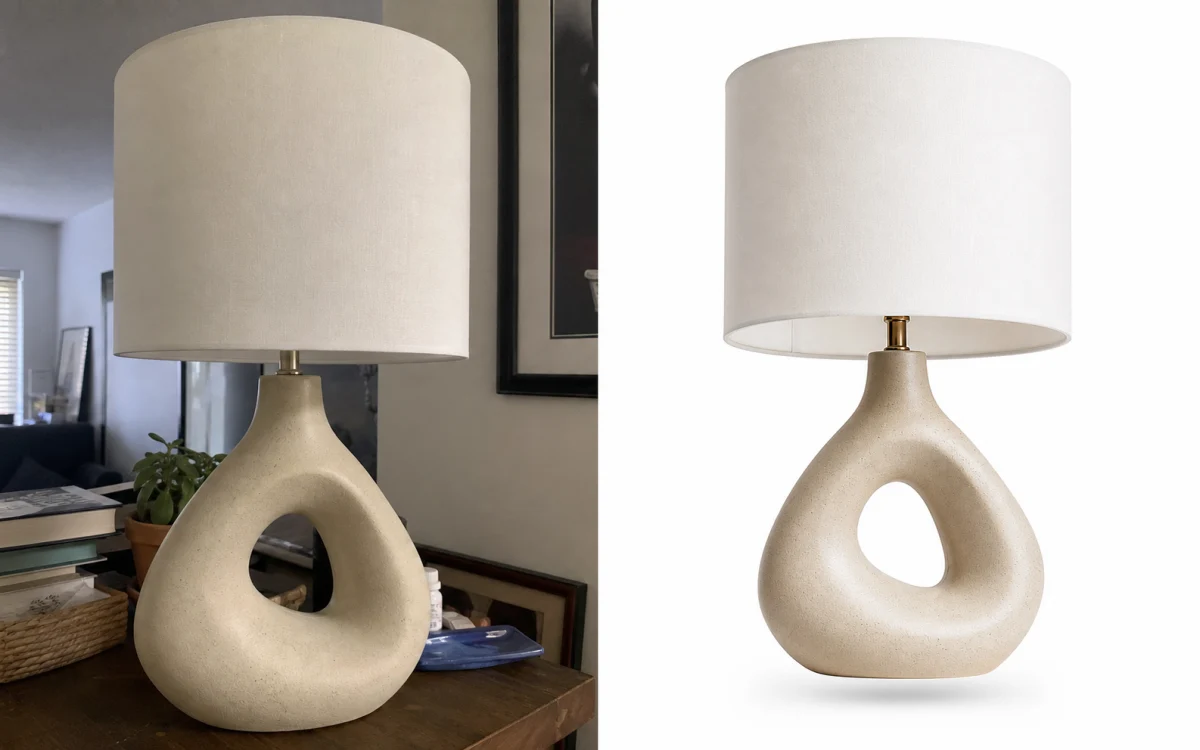
Studio product photo
Create a premium studio product image with a warm neutral background and realistic grounded shadow
Product photo prompts
See how a clean source product can move into a more polished studio or campaign direction while the prompt explicitly protects the product details that matter.
Use the source product as the authority for shape, proportions, colors, label placement, and materials, then change only the environment and presentation.
Treat the source product as the part that should stay stable, then describe the new environment, light, composition, or campaign direction as the part that should change.
Choose a sharp photo where the full shape, important labels, materials, edges, and colors are visible.
State the exact silhouette, proportions, packaging, logo area, colors, materials, camera angle, or texture that should remain consistent.
Specify background, surface, props, lighting direction, shadow softness, crop, and negative space instead of using vague words such as professional or premium.
Check product shape, labels, materials, perspective, shadows, and edges at full size, then correct the most visible problem in the next prompt.
A useful product-edit prompt separates the commercial change from the product details that must remain authoritative.
Start with the new scene or edit, list the product details that must stay stable, then explain how the product should sit naturally in the new environment.
Describe a warm-gray seamless background, softbox light from camera left, realistic contact shadow, eye-level camera, or shallow depth of field instead of asking only for a better product photo.
AI editing can alter small text, logos, packaging, proportions, and surface details. Inspect those elements before publishing a commercial image and keep exact brand copy in your normal production workflow.
Use prompt-based editing for ecommerce backgrounds, lighting, composition, campaign variations, and product-detail preservation while keeping model and output controls visible.
Tell the model which product cues are authoritative: silhouette, proportions, labels, colors, materials, stitching, hardware, packaging, or other details that should remain recognizable.
Keep prompt, model, aspect ratio, resolution, quality, and style settings together so you can test catalog, marketplace, social, and campaign directions from one source.
Change the background, lighting, crop, prop styling, or mood separately when consistency matters. Smaller iterations make it easier to see what caused product drift.
Explore clean studio shots, lifestyle settings, launch visuals, seasonal art direction, and other product presentations without asking the model to redesign the item.
Sign in to generate, keep completed work in ClipLumi History, return to a useful direction, and continue editing without rebuilding the brief.
Transparent AI image pricing with monthly plans, yearly plans, and one-time credit packs. New accounts start with 1 free credit, and the exact model cost is shown before generation.
Billed annually · $240$120/year
Choose ProAvailable image models
Billed annually · $480$240/year
Choose UltimateAvailable image models
Billed annually · $960$480/year
Choose MaxAvailable image models
Answers about editing ecommerce product photos, backgrounds, lighting, product consistency, prompts, supported files, sign-in, and generation costs.
An AI product photo editor changes an existing product image with text instructions. Instead of rebuilding the item from a blank prompt, you can use the source photo as the visual anchor and ask for a new background, lighting setup, crop, scene, or campaign direction while naming the product details that should stay consistent.
Use the clearest source image available and explicitly preserve the silhouette, proportions, label placement, colors, materials, surface finish, camera angle, and any other business-critical details. Avoid changing several unrelated variables at once, and always inspect the final result because no generative model can guarantee exact product preservation.
Yes. Describe the new environment separately from the product. For example, ask for a warm-gray studio sweep or a bright kitchen countertop while preserving the exact product geometry, edge detail, scale, colors, and camera angle. Add instructions for contact shadows, reflections, and light direction so the product belongs in the new scene.
You can create visual directions for marketplace listings, ecommerce product pages, social posts, and campaign concepts by choosing an appropriate aspect ratio and describing the required composition. Each marketplace has its own current image rules, so verify background, crop, text, and policy requirements on the destination platform before publishing.
Yes. Ask for a clean white background, full product visibility, true product colors, preserved edges, and a subtle realistic shadow if appropriate. Review the result for altered labels, transparent edges, reflections, or proportions before using it as a catalog asset.
You can ask for softer studio light, stronger side light, warmer color temperature, or a darker launch atmosphere while explicitly preserving the product shape, materials, colors, and camera perspective. The more important consistency is, the more specific your preserve instructions should be.
The editor accepts JPG, PNG, and WebP images up to 20 MB. A sharp original file is usually a better reference than a compressed screenshot, especially when labels, stitching, material texture, or small design details matter.
You can configure the editor before signing in. Generation requires a ClipLumi account and enough credits for the selected model and settings. The live credit total shown before submission is the source of truth because different models, qualities, resolutions, and reference-image options can cost different amounts.
Not always. It is useful for exploring backgrounds, lighting, compositions, campaign concepts, and faster iterations, but commercial assets still need normal review for exact logos, legal text, packaging, product color, geometry, accessibility, and marketplace requirements.